Smarter Redesigned Social Icons Editor, Better Styling & QR Improvements Wsla v1.79 release
Wsla v1.79 is here, bringing a cleaner and more flexible way to manage your profile, social icons, links, themes, and QR codes. This update focuses on one simple idea: your Wsla profile should be easier to organize, easier to customize, and easier to keep consistent with your brand. Whether you are a creator, business owner, designer, marketer, or personal brand, your social icons are often one of the first things visitors notice. They help people follow you, message you, explore your content, and connect with your brand across platforms. That is why Wsla v1.79 introduces a major improvement to social icon management, along with new icons, new styling options, cleaner alignment, better link search, improved dark mode behavior, QR improvements, and important fixes. Let’s walk through everything new.
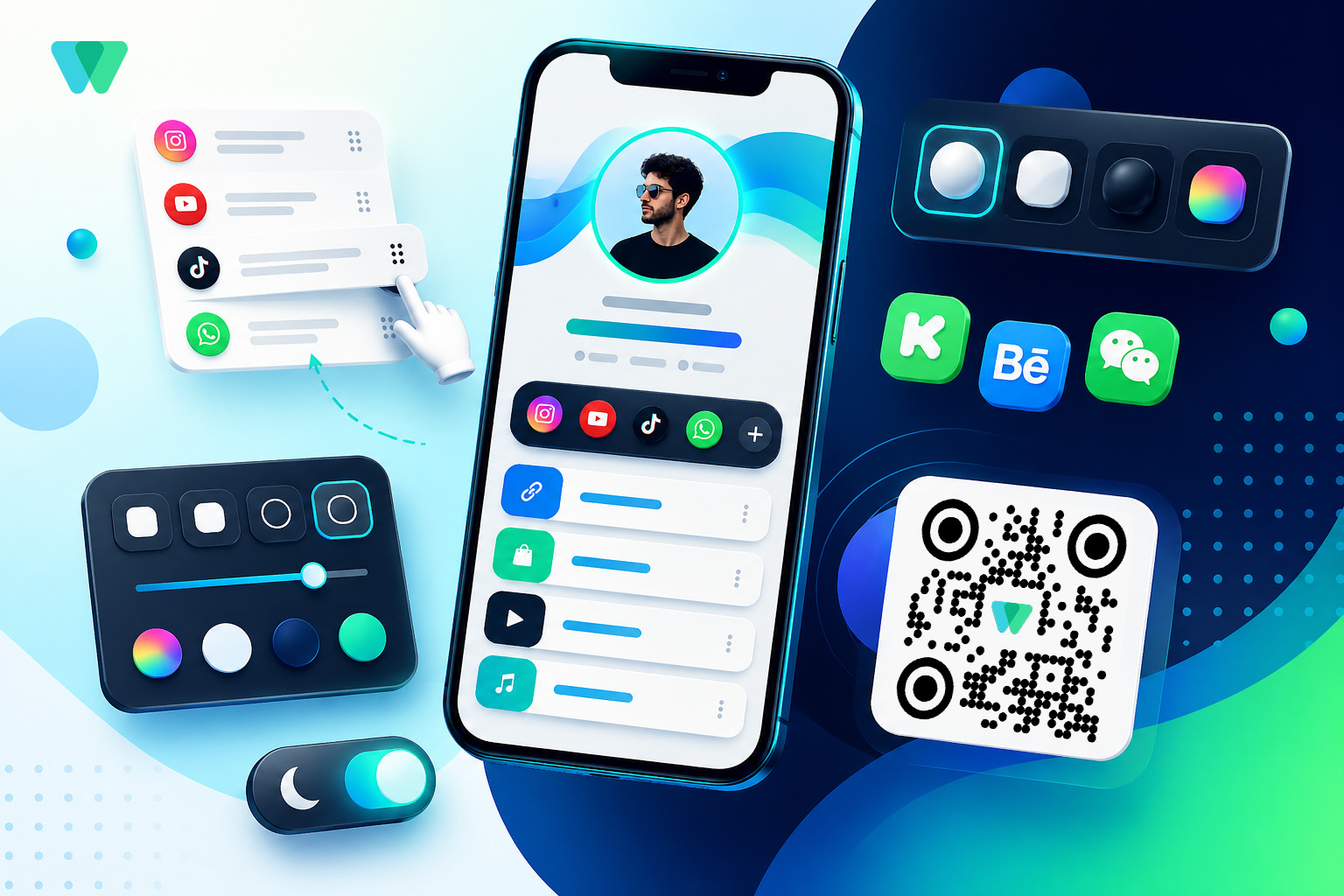
What’s New in Wsla v1.79?
Wsla v1.79 includes improvements across profile customization, social media icons, search, themes, sharing, QR codes, and link redirection.
Here are the main updates:
- New social icons: Kick, Behance, and WeChat
- Drag-and-drop social icon ordering
- Enable or disable social icons without deleting them
- New social icon styling options
- Better themes page filtering
- Improved social icon alignment when icons wrap into multiple lines
- Improved link search for uppercase and lowercase searches
- Updated link share icon for better consistency
- Improved dark mode toggle
- Fixed Fork / OneLink short URL automatic redirection
- Enhanced customized QR Code and QR download format dropdown
New Social Icons: Kick, Behance, and WeChat
Wsla now supports three new social icons:
Kick Perfect for streamers and creators building an audience through live content.
Behance Useful for designers, artists, photographers, motion designers, branding specialists, and creative professionals who want to showcase their portfolio.
WeChat Helpful for users and businesses who connect with audiences, clients, or communities through WeChat. These additions give creators and businesses more flexibility in how they represent their digital presence. Instead of forcing every user into the same common social platforms, Wsla continues to expand support for different types of creators, regions, communities, and industries.
A Better Social Icons Editor
One of the biggest updates in Wsla v1.79 is the enhanced social icons editor. Before, managing social icons could feel more limited when users wanted to change the order, hide an icon temporarily, or keep their setup clean without losing existing data. Now, the experience is much more flexible.
Drag and Drop Your Social Icons
You can now arrange your social media icons by dragging them into the order you want. To use it, click the sort icon to activate drag-and-drop mode, then move your icons into place. This works on both desktop and mobile, making it easier to update your profile from any device.Why Icon Order Matters
The order of your social icons can affect how visitors interact with your profile. For example:- A streamer may want Kick or YouTube first.
- A designer may want Behance and Instagram first.
- A business may want WhatsApp, Instagram, and email-related links more visible.
- A personal brand may want LinkedIn before other platforms.
- A musician may want Spotify, YouTube, and TikTok near the front.
Enable or Disable Icons Without Deleting Them
Another important improvement is the ability to enable or disable social icons without deleting them.
This is a small change with a big benefit. Sometimes you may want to hide a social icon temporarily. Maybe the platform is not active right now. Maybe you are changing your strategy. Maybe you want a cleaner profile during a campaign. Or maybe you want to test whether fewer icons lead to better clicks. Previously, deleting an icon could mean losing the setup or affecting how you manage its history. Now, you can simply disable the icon while keeping it saved. This is especially useful if you want to preserve analytics history and avoid rebuilding the same social icon again later.
Example Imagine you added a social icon for a seasonal campaign or a temporary platform push. After the campaign ends, you may not want the icon visible anymore. Instead of deleting it, you can disable it. Later, if you decide to use it again, you can enable it without starting from scratch. That gives you more control and less risk.
New Social Icon Styling Options
Wsla v1.79 also gives you more visual control over how your social media icons appear. You can now customize social icons using:
- Icon size: XS, S, M, L
- Roundness size: XS, S, M, L
- Theme style: 3D, Light, Dark, and Original Color
Icon Size
Different profiles need different visual balance. A minimal profile may look better with smaller icons. A bold creator page may look better with larger icons. A business profile may need a clean and professional size that feels clear without taking too much space. The new size options help you control that balance.Roundness
Roundness changes the shape and feel of the icons. A sharper style can feel modern and structured. A softer rounded style can feel friendly and casual. Fully rounded icons can feel clean and familiar. With XS, S, M, and L roundness options, you can better match your brand style.Icon Themes
The new icon themes give your profile more personality:3D A more dimensional and eye-catching style.
Light A clean and soft style that works well on bright profiles.
Dark A bold style that works well on dark profiles or high-contrast designs.
Original Color Keeps the recognizable colors of each social platform. This gives users more freedom to design a profile that feels consistent instead of visually random.
Better Social Icon Alignment
Social icons can wrap into multiple lines when there are many icons or when the visitor is using a small mobile screen.
In Wsla v1.79, alignment has been improved so social icons stay centered even when they wrap into more than one line.
This helps profiles look more polished, especially on mobile.
For link-in-bio pages, small layout details matter. A row of icons that looks slightly off can make the page feel less professional. Centered wrapping creates a cleaner and more balanced design.
Improved Themes Page
The themes page has also been improved. Now, Wsla shows only public and approved themes, helping users browse cleaner and more reliable theme options. This makes the themes experience more organized and reduces confusion. The update also improves personal icon color handling, helping theme visuals feel more consistent.
Why This Matters
Themes are one of the fastest ways to change the look and feel of a Wsla profile. But as the number of themes grows, the browsing experience becomes more important. By showing only public and approved themes, Wsla makes it easier for users to find designs that are ready to use.Smarter Link Search
Search has also been improved. Capital letters or lowercase letters no longer matter. Users can get better link search results regardless of how they type. This is especially useful for profiles with many links. For example, a visitor searching for “YouTube,” “youtube,” or “YOUTUBE” should still find the right link. This makes the experience smoother for visitors and more reliable for profile owners.
Why Link Search Is Important
As creators and businesses add more links, profiles can become larger and more content-rich. Search helps visitors find exactly what they need faster.That can be useful for:
- Product links
- Video links
- Menu links
- Service pages
- Booking pages
- Portfolio items
- Campaign links
- Download links
- Contact links
Consistent Share Icons
The link share icon has been updated to be more consistent with the profile share icon. This improves the visual language across Wsla.
When icons feel consistent, users understand the interface faster. It also makes the product feel more polished and professional. Small design improvements like this help create a smoother experience across the admin panel and profile pages.
Improved Dark Mode Toggle
Dark mode continues to be an important part of the user experience.
In Wsla v1.79, the dark mode toggle has been improved for a cleaner and more polished interaction.
This helps users who prefer dark interfaces or manage their pages in different lighting conditions.
Dark mode is not only about appearance. It is also about comfort, readability, and creating a more flexible interface.
Fixed Fork / OneLink Short URL Redirection
Wsla v1.79 also fixes an automatic redirection issue related to Fork / OneLink short URLs. Fork links are useful when you want one link to behave in a smarter way based on where or how it is opened.
A reliable redirection experience is important because users often share short URLs in places where every click matters, such as:
- Instagram bio
- TikTok bio
- QR codes
- Campaigns
- Ads
- Printed materials
- Product packaging
- Event posters
Enhanced QR Customization and Download Format Dropdown
QR codes are an important part of Wsla because they connect offline moments to online actions. With Wsla, users can generate QR codes for their pages and links, then use them on business cards, menus, posters, packaging, stickers, events, and more. In v1.79, the Customize QR Code experience and QR download format dropdown have been improved. This makes it easier to customize and download QR codes in the format you need.
Why QR Improvements Matter
QR codes are especially useful for businesses and creators who connect with people in the real world.For example:
- A restaurant can place a QR code on a table menu.
- A designer can add a QR code to a business card.
- A creator can place a QR code on event materials.
- A shop can add a QR code to packaging.
- A speaker can show a QR code during a presentation.
- A brand can use QR codes in printed campaigns.
Practical Examples: How to Use v1.79
For Streamers
A streamer can add Kick, YouTube, Twitch, TikTok, and Instagram icons, then drag Kick to the first position during a live-streaming campaign. If the campaign ends, the streamer can disable Kick temporarily without deleting the icon.For Designers
A designer can add Behance as a key portfolio destination, place it near the front, and choose a clean icon style that matches the profile theme. This makes the Wsla page feel more like a professional creative portfolio.For Small Businesses
A small business can organize social icons based on customer behavior. For example, WhatsApp first for direct messages, Instagram second for social proof, and TikTok third for discovery. The business can also use QR codes on packaging or printed materials to send customers to the Wsla profile.For Personal Brands
A consultant, coach, speaker, or freelancer can place LinkedIn first, followed by Instagram, YouTube, and booking links. With improved icon styling and alignment, the profile can feel more premium and organized.Mistakes to Avoid
1. Adding Too Many Icons Without Prioritizing
More icons can be useful, but too many can also create visual noise. Use drag-and-drop ordering to place the most important platforms first.2. Deleting Icons Too Quickly
If you only want to hide an icon, disable it instead of deleting it. This helps preserve your setup and analytics history.3. Mixing Too Many Visual Styles
Try to choose an icon style that matches your profile design. For example, if your profile is minimal, Light or Original Color may work better. If your profile is bold, 3D or Dark may be more suitable.4. Ignoring Mobile Layout
Many visitors open link-in-bio pages on mobile. Check how your icons look when they wrap into more than one line.5. Forgetting to Test Search
If your Wsla page has many links, test your link search with different capitalizations and common visitor keywords.Pro Tips for Wsla v1.79
Put Your Most Valuable Social Platform First
Your first few icons usually get the most attention. Place your most important platform first.Use Disabled Icons for Campaign Planning
You can prepare icons in advance, keep them disabled, and enable them when a campaign starts.Match Icon Style With Your Theme
Use icon size, roundness, and theme style to match your overall profile design.Use QR Codes for Offline Growth
Add your Wsla QR code to business cards, menus, stickers, packaging, or event materials.Review Your Profile After Every Major Change
After reordering icons or changing styles, open your live Wsla page and check how it looks as a visitor.Why This Update Matters
Wsla v1.79 is not just about adding more options. It is about making Wsla feel more flexible and easier to manage.
A strong link-in-bio page should be:
- Easy to update
- Clean on mobile
- Consistent with your brand
- Simple for visitors to navigate
- Ready for both online and offline sharing
- Flexible enough to support different campaigns
FAQ
What is new in Wsla v1.79?
Wsla v1.79 adds new social icons, a drag-and-drop social icons editor, enable/disable controls, new icon styling options, improved themes page filtering, better social icon alignment, improved link search, dark mode improvements, a Fork / OneLink redirection fix, and QR customization improvements.What new social icons were added?
Wsla v1.79 adds Kick, Behance, and WeChat social icons.Can I reorder my social icons?
Yes. You can activate sort mode and drag your social icons into the order you want. This works on desktop and mobile.Can I hide a social icon without deleting it?
Yes. You can disable a social icon instead of deleting it. This helps you keep the icon saved and preserve its analytics history.What social icon styling options are available?
You can customize icon size, roundness, and theme style. The available style themes include 3D, Light, Dark, and Original Color.Did Wsla improve QR codes in v1.79?
Yes. Wsla v1.79 improves the Customize QR Code experience and the QR download format dropdown.Did Wsla fix Fork / OneLink short URLs?
Yes. This release fixes an automatic redirection issue related to Fork / OneLink short URLs.Is Wsla v1.79 useful for businesses?
Yes. Businesses can use the update to better organize contact platforms, style social icons, improve profile navigation, and use QR codes across offline materials.Conclusion
Wsla v1.79 brings a more polished and flexible experience to your link-in-bio profile. With new social icons, drag-and-drop ordering, enable/disable controls, better icon styling, improved search, cleaner themes, dark mode refinements, QR improvements, and a Fork/OneLink fix, this update helps you create a profile that is easier to manage and better aligned with your brand.
Try the new social icon editor today, update your profile style, and make your Wsla page even easier for your audience to explore. Create or update your Wsla profile at: https://wsla.to
On this page
Keep reading

Get the Wsla newsletter
One short email, every Friday. Product updates, creator stories, and growth playbooks.